Bottom line: Six routes describe a CS2 player:
/performancefor 12-month figures with percentiles, then/maps,/matches,/teams,/weapons, and/statsfor all-time totals. Every one takes the player's slug in place of the UUID, so/v1/cs2/players/zywoo/performanceworks with no lookup first. The one rule to learn: a figure from fewer than 10 recorded maps comes backnull, and so does its percentile. Examples below run against the EsportsOdds CS2 data API.
The six player routes
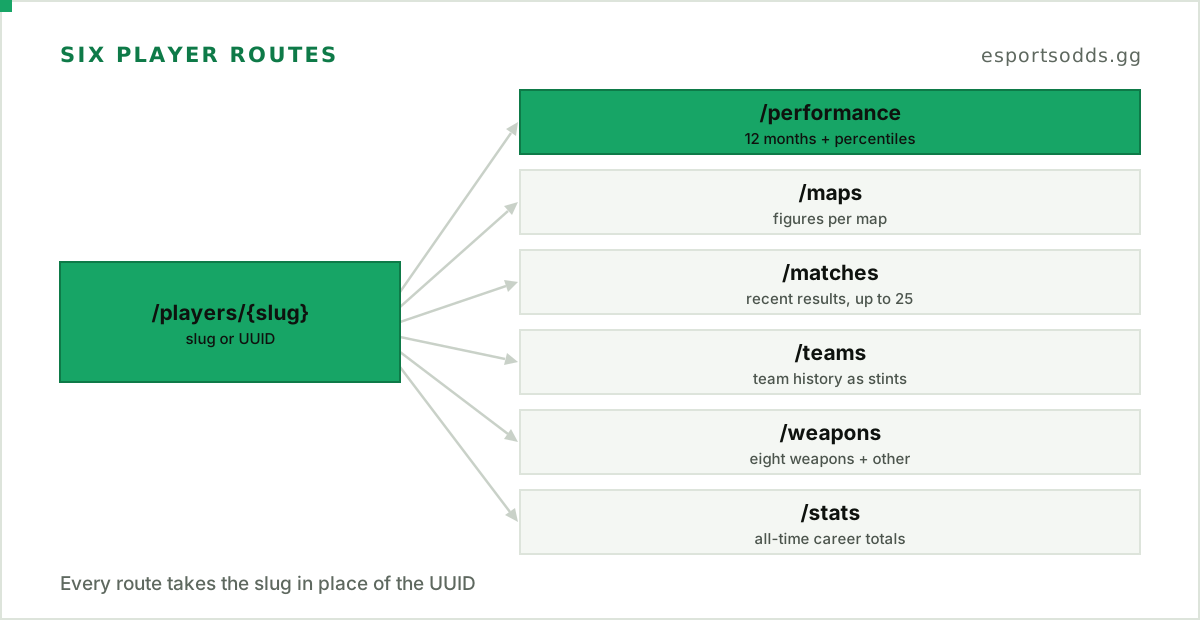
All six are GET routes under /v1/cs2/players/{id}, and {id} is the player's UUID or slug. A slug the player was renamed away from still resolves, and the slug field in the response gives the current one. If all you have is a handle, GET /v1/cs2/players?slug=zywoo returns the matching row.
| Route | Returns | Window |
|---|---|---|
/performance | ten figures, each with a percentile | last 12 months |
/maps | maps played, ADR, KAST and K/D per map | last 12 months |
/matches | recent completed matches with the player's own line | newest first, up to 25 |
/teams | team history as stints | every completed match |
/weapons | the top eight weapons, an other row, and hit groups | last 12 months |
/stats | career totals and averages | every completed match |
Figures with percentiles
/performance returns ten metrics, each shaped { key, label, unit, value, n, percentile }. Here is ZywOo's response, trimmed to three of the ten:
{
  "data": {
    "slug": "zywoo",
    "nickname": "ZywOo",
    "role": "AWP",
    "level": "established",
    "window": { "months": 12, "through": "2026-10-11T15:00:00Z" },
    "population": { "n": 1086, "level_definition": "..." },
    "metrics": [
      { "key": "kd", "label": "Kills per death", "unit": "ratio", "value": 1.51, "n": 194, "percentile": 99.9 },
      { "key": "adr", "label": "Damage per round", "unit": "per_round", "value": 87.1, "n": 194, "percentile": 99.2 },
      { "key": "headshot_share", "label": "Headshot share of kills", "unit": "percent", "value": 41.7, "n": 194, "percentile": 19.3 }
    ]
  }
}
Every figure is built the same way.
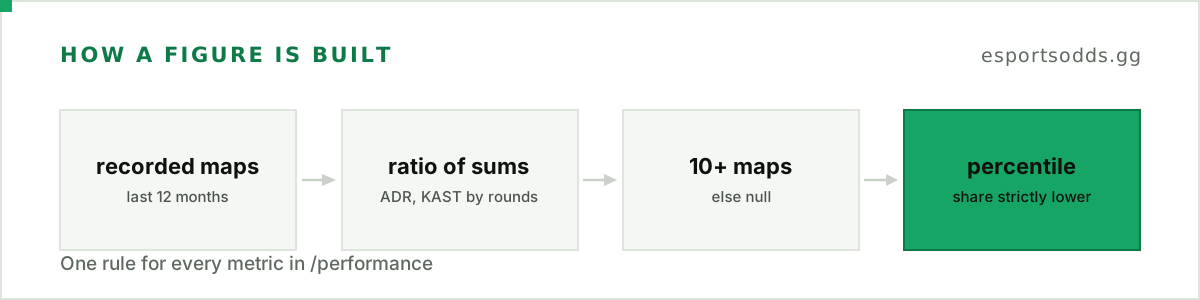
Only recorded maps count: a map played to a result, in a completed Counter-Strike 2 match that was not a walkover, where the player's line is complete and attributed to one of the two teams. A rate is a ratio of sums across those maps (ADR and KAST weighted by rounds), never an average of per-map figures, and n says how many maps it uses. The percentile is the share of the population with a strictly lower value, floored to one decimal, so it never reads 100. The population is every player with a player page, 1,086 of them in this response, and level (established, listed or none) says where this player stands against the rule in population.level_definition.
Percentiles describe a profile; they don't grade it. ZywOo's headshot share sits at the 19.3rd percentile, and /weapons shows why: 155 of his 1,377 AWP kills were headshots. The definition object carries the exact wording of every rule, so quote it in your UI rather than paraphrasing.
Per-map figures
/maps lists every competitive map the player has at least one recorded map on in the window, most played first:
[
  { "map_name": "de_dust2", "active_pool": true, "maps": 44, "adr": 89.5, "kast": 81.2, "kd": 1.68, "n_adr": 44, "n_kast": 44 },
  { "map_name": "de_cache", "active_pool": true, "maps": 8, "adr": null, "kast": null, "kd": null, "n_adr": 8, "n_kast": 8 }
]
The second row is the 10-map floor at work: eight maps, so every figure is null. active_pool says whether a map is in the current Active Duty pool, which lets you hide retired maps without keeping your own list (de_overpass and de_train are false in this response).
Recent matches and team history
/matches returns completed matches newest first, with the tournament and its tier and the player's kills, deaths and ADR for the whole match. limit defaults to 10 and stops at 25; a larger value returns 25, and there is no cursor. One row, with the team ids trimmed:
{
  "match_id": "01a1279b-1147-72ee-b660-745c54b5cc35",
  "date": "2026-10-11T15:02:10Z",
  "team": { "name": "Vitality", "slug": "vitality" },
  "opponent": { "name": "MOUZ", "slug": "mouz-cs2" },
  "tournament": { "name": "ESL Pro League Season 24", "tier": "S" },
  "format": "bo5",
  "score_for": 3,
  "score_against": 0,
  "kills": 64,
  "deaths": 33,
  "adr": 90.6
}
Walkovers are left out. When a player's line names no team, team, opponent and both scores are null.
/teams turns the same lines into stints, each a run of consecutive matches for one team. A run shorter than min_matches (3) is a stand-in appearance and is left out unless it is the current one, and the newest stint is current only while its last match falls within 90 days of the newest result in the data. ZywOo has one stint: Vitality, 219 matches and 516 maps, current: true. A stint starts at the first match our data attributes to that team, so treat it as a playing record, not a contract date.
Weapons and hit groups
/weapons sums weapon data over the player's matches in the last 12 months. It is recorded per match, never per map, so matches (81 here) counts matches, and window.through dates the newest of them. The eight weapons with the most kills are listed and the rest fold into one other row; hit_groups splits hits, damage and kills by body area.
Build a player card in Python
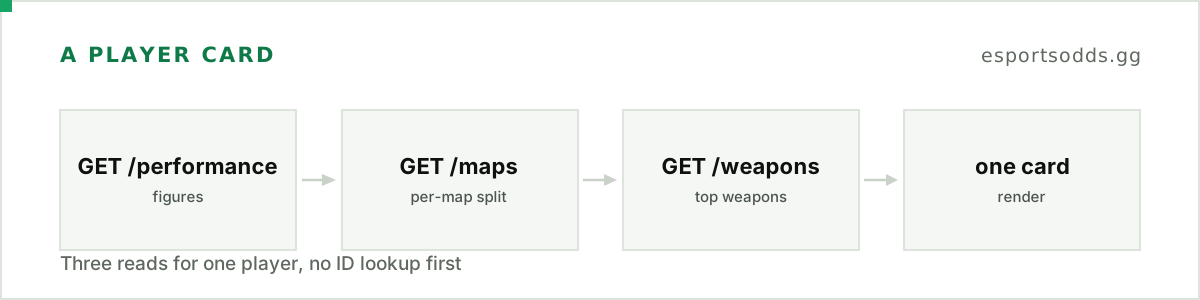
Three reads give you a compact card: the figures, the per-map split and the top weapons.
import os
import requests

BASE = "https://api.esportsodds.gg/v1/cs2"
HEADERS = {"Authorization": f"Bearer {os.environ['ESPORTSODDS_API_KEY']}"}


def get(path: str) -> dict:
    resp = requests.get(f"{BASE}{path}", headers=HEADERS, timeout=15)
    resp.raise_for_status()
    return resp.json()["data"]


def player_card(slug: str) -> None:
    perf = get(f"/players/{slug}/performance")
    maps = get(f"/players/{slug}/maps")
    weapons = get(f"/players/{slug}/weapons")

    print(f"{perf['nickname']} ({perf['role'] or 'role unknown'}), "
          f"last {perf['window']['months']} months to {perf['window']['through'][:10]}")
    for m in perf["metrics"]:
        if m["value"] is None:
            continue  # fewer than 10 recorded maps: no figure, no percentile
        print(f"  {m['label']:<26}{m['value']:>7}   p{m['percentile']}")
    for row in maps["maps"]:
        if row["kd"] is not None:
            print(f"  {row['map_name']:<12}{row['maps']:>4} maps   ADR {row['adr']}   K/D {row['kd']}")
    top = [w for w in weapons["weapons"] if w["slug"] != "other"][:3]
    print("  top weapons: " + ", ".join(f"{w['name']} {w['kills']}" for w in top))


player_card("zywoo")
Run against the live API, it prints:
ZywOo (AWP), last 12 months to 2026-10-11
  Maps                          194   p89.1
  Matches                        81   p85.4
  Kills per death              1.51   p99.9
  Damage per round             87.1   p99.2
  KAST                         78.3   p99.7
  Headshot share of kills      41.7   p19.3
  Opening duels won            63.4   p95.3
  Rounds with a multi-kill     21.9   p99.5
  Clutches per map             0.46   p97.3
  Trade share of kills         18.7   p31.4
  de_dust2      44 maps   ADR 89.5   K/D 1.68
  de_mirage     34 maps   ADR 86.7   K/D 1.53
  de_nuke       32 maps   ADR 86.7   K/D 1.38
  de_inferno    31 maps   ADR 85.4   K/D 1.39
  de_overpass   20 maps   ADR 89.7   K/D 1.69
  de_anubis     18 maps   ADR 77   K/D 1.22
  top weapons: AWP 1377, AK-47 876, M4A4 208
Skipping a null is the right move: it is an honest absence, never a zero, and printing it as 0 would put a figure on the card that the data does not support.
Gotchas
- KAST is 0 to 100 here. On these routes
kastis a percentage; on a stat line from/matches/{id}/statsit is a 0 to 1 fraction. If you mix the two, see Analysing CS2 stats in Python for the per-match shape. - Percentiles move with the population. They compare against every player with a page, and that set changes as players cross the map thresholds, so store the value and
nalongside any percentile you cache. /matchesis short by design. It stops at 25 rows. For a deeper history, page the team's matches (/matches?team=) and read each match's stats.- Player routes need a subscription key. The sandbox key reads a fixed sample of past matches, not the player routes.
Where to go next
The full field reference is on the player stats docs page. To turn career numbers into a projection, the fantasy projections guide builds on /stats. And if you want to see these 12-month figures before writing any code, the public player pages show them for every player with a page.
One slug, three requests, and a profile that says exactly how many maps stand behind each number.